A printed date or barcode is useful only when its meaning is clear, its data is correct, and the mark remains readable on the finished pack. By the end, you will know how to structure batch information, choose date and barcode formats, position marks on different packaging, and test whether a handheld inkjet printer suits your production work.
Key takeaways
- Link each batch code to production records, checks, operators and distribution.
- Use one date format and label whether it means manufacture or expiry.
- Clean, dry the surface and inspect every mark for contrast and completeness.
- Choose a barcode your supply chain accepts, then test scans on real packs.
What information belongs in a batch code?
A batch code identifies a group made under the same controlled conditions. It is useful only when your batch record links it to ingredients, operators, equipment, production time, quality checks, and distribution, so you can reconstruct a lot during a targeted recall.
| Mark | What it means | Example |
|---|---|---|
| Batch code | Internal traceability identifier for one production group | 260318-L2-B-047 |
| Lot number | Another name for a production group identifier | LOT 047 |
| Manufacture date | Date production or packing occurred | 18/03/2026 |
| Expiry date | Date after which the product must not be used or sold | 18/03/2028 |
| Best-before date | Date until which quality is expected to remain optimal | Best before 03/2027 |
| Serial number | Unique identifier for one individual item | SN 000847 |
| Barcode | Machine-readable linear symbol carrying encoded data | Code 128 |
| QR code | Two-dimensional symbol carrying more data, including a web address or lot details | GS1 QR Code |
Build a practical batch code from the production date, line identifier, shift code, and lot sequence: 260318-L2-B-047 means 18 March 2026, line 2, shift B, sequence 047. Keep the printed format short, readable, and documented.
Food cartons, cosmetics, medicines, chemicals, agricultural inputs, spare parts, cables, and shipping boxes use these marks. A barcode or QR code does not replace the human-readable code or the manufacturing record.
How do you print an expiry date without creating confusion?
Print the manufacture date and final-use date as separate, labelled fields. A clear mark prevents a pack made on 03/04/2026 from being mistaken for one expiring on that date.
| Format | Use | Main control |
|---|---|---|
| DD/MM/YYYY | Day-specific consumer dates | Use only where the jurisdiction and market expect day/month order |
| MM/YYYY | Products with month-level shelf-life rules | Do not imply the first or last day without approved wording |
| YYYY-MM-DD | Unambiguous human-readable text | Confirm that the product label rule permits this format |
A use-by date addresses safety: do not use the product after that date. A best-before date addresses quality: flavour, texture, performance, or appearance may decline after it. The required wording, date precision, and placement depend on the product category and jurisdiction, so do not substitute “expiry date” for legally required language.
For GS1 data, use application identifier (11) for production date and (17) for expiration date, both encoded as YYMMDD. Use (10) for the batch or lot number. Because the lot field has variable length, insert a separator after it when another element follows; otherwise the scanner cannot identify where the lot ends.
Control the process, not just the print:
- Calculate shelf life from the approved production event using locked date arithmetic.
- Restrict recipe and date changes to authorised users.
- Show the operator a readable preview before printing.
- Check date rollover, such as 31 December to 1 January.
- Approve the first printed item against the batch record.
A readable expiry date does not replace the approved shelf-life calculation, manufacturing record, or compliance review.
How should you prepare, position and inspect a handheld-printed mark?
Prepare the mark from the approved production record, not by typing each item manually. Set the date, lot, line and shift fields, confirm the readable preview, then use this workflow:
- Select or load the ink cartridge specified for the substrate. Aqueous, fast-drying ink suits porous cartons and uncoated paper; glossy film, plastic, glass and metal need chemistry tested for adhesion, drying and rub resistance.
- Test-print the complete message on the actual package, including its barcode, font, character height and data length. Check it after the planned handling time, not only while wet.
- Align the handheld inkjet printer square to the print path. Keep the specified stand-off distance, move at a steady speed and avoid tilting; changes alter character height, baseline and dot registration.
- Place the mark on a flat, clean area. On curved bottles, follow the surface without sweeping across its curve; on flexible pouches, cartons, labels, trays and sealed packs, avoid seams, tear lines, closures, folds and rubbing points.
- Print the production run only after approving the first package. Record the job or lot used so the physical mark matches the batch record.
- Inspect the first output for missing dots, merged dots, smearing, contrast, legibility and barcode geometry. Recheck continuing output at set intervals and whenever speed, package orientation, ink or cartridge changes.
A large alphanumeric code may remain readable with slight dot distortion, but a compact Data Matrix needs clean modules and an uncontaminated background. Verify either at production speed and scan distance.
Which barcode should you print, and how do you prove it scans?
Choose a one-dimensional barcode for a short identifier and established retail scanning; choose a 2D symbol when batch, expiry, serial, or other data must fit a small area.
| Symbol | What it carries | Best use |
|---|---|---|
| Code 128 | Variable alphanumeric identifier | Internal products, cartons, logistics labels |
| EAN-13 | Product or package configuration number | Retail scanning outside North America |
| UPC-A | Product or package configuration number | Retail scanning in North America |
| Data Matrix | Compact encoded data | Small packs, components, medicines, or dense variable data |
| QR code | Larger data or a web destination | Consumer access, instructions, authentication, or traceability |
| GS1 DataMatrix | GS1 data such as GTIN, lot, and expiry | Regulated or space-limited traceability |
| GS1 QR Code | GS1 data plus a web link or extra information | Consumer-facing product information |
EAN-13 and UPC-A do not normally contain a batch number or expiry date. Add human-readable text, a second data carrier, or a 2D symbol such as GS1 DataMatrix or GS1 QR Code.
Leave the specified quiet zone clear; a nearby batch mark can cause failed reads. Use strong contrast, enough module size, and ink that does not spread into adjoining dots. Check absorbent stock, background contamination, curved-surface distortion, and handheld movement at the real scan distance and production speed.
A scanner decoding the barcode proves only that one device read it. Formal verification grades linear symbols against ISO/IEC 15416 and 2D symbols against ISO/IEC 15415, identifying print defects that a successful scan can miss. Verify the finished mark on the actual substrate, not just on-screen or on a flat test sheet.
When is a handheld inkjet printer the right coding choice?
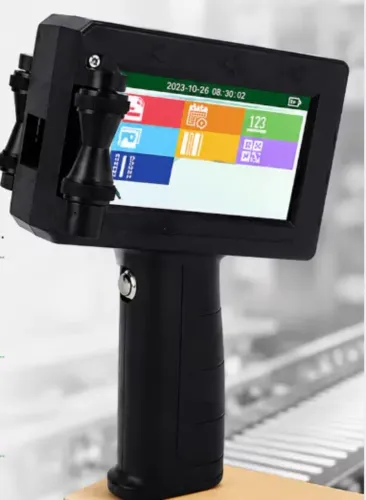
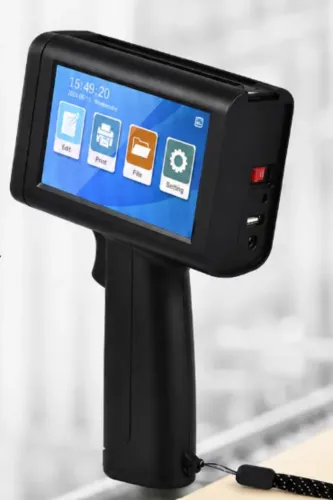
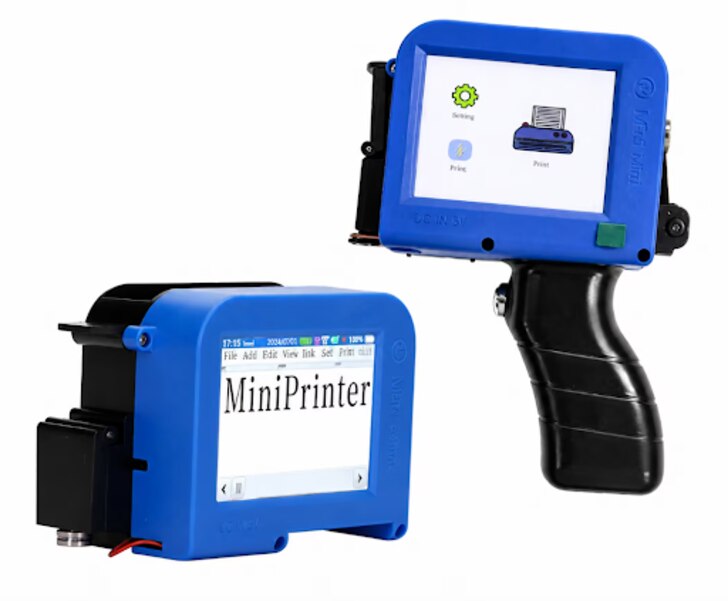
Choose a handheld inkjet printer when items arrive in inconsistent positions, cannot pass a fixed printer, or change frequently enough to make line-mounted coding inefficient. It fits cases, pallets, short production runs, and line changeovers where moving the printer is easier than moving the product.
| Option | Why handheld coding fits | Main control |
|---|---|---|
| Irregular items | Place the mark where the surface allows | Keep the angle and stand-off distance consistent |
| Cases and pallets | Reach large or already stacked packaging | Expect slower operator movement |
| Short runs | Change messages without lengthy setup | Lock recipes and check the first mark |
| Fixed-printer failures | Code items too large, heavy, or awkward to convey | Test adhesion and drying on the actual substrate |
The trade-off is operator control. Walking too quickly compresses characters; changing angle or distance creates an uneven baseline, missing dots, distorted bars, or inconsistent character height. Large alphanumeric codes tolerate more variation than Data Matrix symbols, whose modules can merge or disappear.
Run a trial using the actual:
- Message length and font
- Barcode module size and scan distance
- Ink and substrate
- Production speed and operator movement
Do not approve the result from nominal resolution or a visual glance. Perform substrate testing and barcode verification at production speed; a scanner may decode a symbol that fails ISO/IEC 15415 or ISO/IEC 15416 grading. Sun Graphics can help compare industrial coding and coding equipment while fitting the choice to customized stamp and document-workflow requirements.
Keep traceability controls and verified output ahead of portability.
Related products
 | Handheld Inkjet Printer G-11 BODY Handheld Inkjet Printer ₹8000 High Performance Coding Solution The **G-11 BODY Handheld Inkjet Printer** is a powerful and reliable coding solution designed for modern industries... View product → |
 | Handheld Inkjet Printer G-35 SMART TIJ Handheld Coding Printer G-35 SMART TIJ Handheld Coding Printer The G-35 SMART is a compact and intelligent Thermal Inkjet (TIJ) printing solution designed for easy,... View product → |
Frequently asked questions
What information belongs in a batch code?
Use a code that links the product group to ingredients or materials, operators, equipment, production time, quality checks and distribution records. The code must let you reconstruct the lot during a targeted recall.
How do you print an expiry date without creating confusion?
Choose one unambiguous date format, such as 31 Dec 2027 or 2027-12-31, and state whether the date is the expiry date or manufacture date. Keep the label close to the date and avoid formats such as 03/04/27 when day and month could be reversed.
How should you prepare, position and inspect a handheld-printed mark?
Use a clean, dry surface; hold the printer at a consistent distance and speed; place the mark where handling will not damage it; then check legibility, contrast, missing characters, smearing and alignment before release.
Which barcode should you print, and how do you prove it scans?
Use the barcode format required by your customer, retailer, warehouse or traceability system. Confirm the encoded number, preserve the quiet zones, print enough contrast and test scans on finished packs using the scanners used in your supply chain.
When is a handheld inkjet printer the right coding choice?
Choose it for short runs, variable data, mobile marking, prototypes, maintenance work or lines without a fixed coder. Compare it with a fixed industrial printer when you need high throughput, automated triggering, continuous production or tightly controlled placement.
Related products
 | Handheld Inkjet Printer G-28 MASTER Handheld Inkjet Printer ₹5600 Advanced Coding & Marking Solution The G-28 MASTER Handheld Inkjet Printer is a powerful and portable printing solution designed for high-quality... View product → |
 | Handheld Inkjet Printer G-10 PRO TIJ Industrial Coding Printer G-10 PRO TIJ Industrial Coding Printer The G-10 PRO is a next-generation Thermal Inkjet (TIJ) coding and marking solution designed for high-speed... View product → |
 | Handheld Inkjet Printer G-20 ECO TIJ Coding Printer The G-20 ECO is a reliable and cost-effective Thermal Inkjet (TIJ) coding solution designed to deliver high-quality... View product → |
 | Handheld Inkjet Printer G-05 MINI Handheld Inkjet Printer ₹5100 High Resolution Printing Solution The **G-05 MINI Handheld Inkjet Printer** is a compact and portable coding and marking solution designed for fast,... View product → |